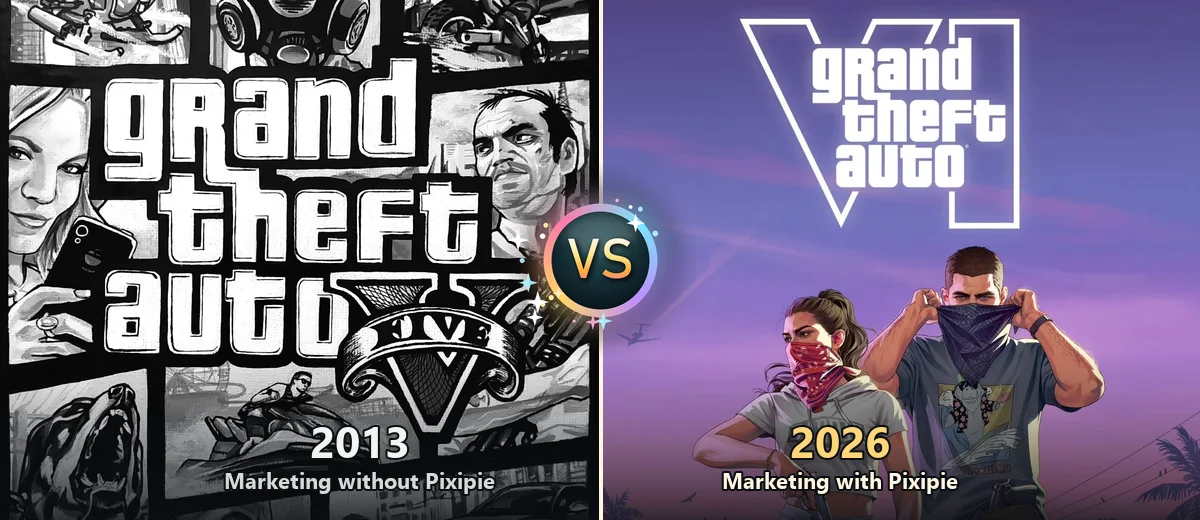
Thirteen years. Two launch days. One very different way to market a small business.
Grand Theft Auto V came out on 17 September 2013. After two delays, Grand Theft Auto VI finally arrived on PS5 and Xbox Series X|S on 19 November 2026. Small business marketing changed more in that gap than the map of Los Santos ever did.
Pixipie is an AI marketing platform for small businesses that helps you plan, create, automate and publish social content, and reply to Google reviews, from one dashboard. This post uses the two game launches as a timeline: what marketing looked like in the GTA 5 era, and what it looks like in the GTA 6 era with Pixipie.
Think of each job below as a mission. Same goal in both eras, very different gameplay.
Here is the short version before the missions. The 2013 column is how most Indian shops, salons, cafes and clinics ran their social media. The 2026 column is the same job with Pixipie features.
| Job | GTA 5 era (2013, without Pixipie) | GTA 6 era (2026, with Pixipie) |
|---|---|---|
| Writing a post | Blank text box, every single time | Ask Pixi drafts from your business details |
| Festival posts | Panic design the night before | Festive dates already on the Content Planner |
| Posting | Log in to each app, one by one | Schedule once for Instagram, Facebook and LinkedIn |
| Google reviews | Unanswered for weeks | AI reply drafts you edit and send |
| Branding | Logo pasted by hand, sometimes stretched | Saved brand watermark on every image |
| Local creators | Cold DMs to strangers | Browse nearby creators on Orbit |
| Approval | You, if you remembered | You, always, before anything goes live |
The last row is the one that did not change. More on that further down.
Open a blank box, type "Visit us today!!!", add twelve hashtags, post, hope.
★★★★★Ask Pixi for a post about this week's special. It writes from your saved name, area, tone and prices.
★☆☆☆☆The 2013 problem was never a lack of effort. It was starting from zero every time. The AI Post Creator starts from what Pixipie already knows about your business, so the first draft names your area and your actual offer.
Level-up tipStill read every draft. Fix anything that is not true, then approve it.
Remember Diwali at 11 pm, borrow a diya image, forget to mention your hours.
★★★★★Festivals already sit on the calendar. Templates and drafts are ready weeks ahead for you to check.
★★☆☆☆Festivals are the boss levels of Indian small business marketing. The Content Planner holds festive and weekly dates in one view, and AI Campaigns keep a run of posts going on the cadence you set.
Level-up tipPlan festival posts two weeks out. The Diwali campaign guide has a 14-day plan you can copy.
Post on Facebook. Then Instagram. Then forget LinkedIn exists. Repeat tomorrow.
★★★★☆Pick the accounts once. One approved post is scheduled to Instagram, Facebook and LinkedIn together.
★☆☆☆☆Fast travel is the best invention in open-world games, and scheduling is the marketing version. Approve on Sunday, and the week publishes on its own.
Level-up tipAdd your Google Business Profile to the same week, so you show up on Maps too.
A one-star review sits unanswered for a month. Every new customer reads it.
★★★★★Pixi drafts a calm, specific reply for each new review. You edit it and send it the same day.
★★☆☆☆Your reputation is your wanted level in reverse: ignore it and it climbs. Google review replies keep the stars from piling up against you.
Level-up tipReply to every review within a day, good or bad. Each AI reply uses PixiCoins, explained in what PixiCoins are.
Logo pasted in a corner by hand, a different size on every post, sometimes stretched.
★★★☆☆Save your watermark once. Every image carries the same mark in the same place.
★☆☆☆☆Consistency is what makes a feed look owned. Brand watermarks and the media library keep your logo and photos in one place.
Level-up tipAdd your items to products and catalogs so Pixi writes about what you really sell.
Search a hashtag, DM ten strangers, hear back from none, give up.
★★★★☆Browse Instagram creators near you by area, niche and budget on Orbit, then shortlist the ones that fit.
★★☆☆☆Every good heist needs a crew. Orbit is where businesses find local creators, and creators find businesses near them.
Level-up tipAgree the brief and the price directly with the creator before anything is posted.
Thirteen years of upgrades, and three rules stayed exactly the same:
The tools got faster. The judgement is still yours, the same way the controller is still in your hands.
You can switch eras tonight. Block fifteen minutes:
When the trial ends, compare plans on pricing. Solo starts at ₹499 a month.
Grand Theft Auto, GTA V and GTA VI are trademarks of Take-Two Interactive Software and Rockstar Games. Pixipie is not affiliated with, sponsored by or endorsed by either company. Banner art: a hand-painted fan rendition of the Grand Theft Auto V cover, and Grand Theft Auto VI key art © Rockstar Games, used here for commentary on the two launch eras.
Only as a timeline. GTA 5 came out in September 2013 and GTA 6 on 19 November 2026, so the two launches make a handy before and after for how small businesses market themselves. The marketing advice is the real subject.
No. Pixipie is an AI marketing platform for small businesses and is not affiliated with, sponsored by or endorsed by Rockstar Games or Take-Two Interactive. Grand Theft Auto is their trademark.
AI drafts posts from your real business details, a planner holds festive and weekly dates, one schedule publishes to Instagram, Facebook and LinkedIn, and review replies are drafted for you to approve. You still check every post before it goes live.
No. Kick Starter is a 14-day free trial with 100 PixiCoins and no credit card. Solo is ₹499 a month after that. See the pricing page for every plan.
No. Pixipie drafts and schedules, but you approve what goes out. Leave a slot empty if a draft is not true for your business.
 Guides · 2026-11-15 · 5 min read
Google Business Profile and Gemini can draft AI review replies. Edit every draft for city, service, and next step so Indian SMBs stay trustworthy.
Read post Guides · 2026-11-14 · 5 min read
Facebook link posts often reach fewer people. Use a native image for Indian SMBs and put the booking or WhatsApp URL in the first comment.
Read post Guides · 2026-11-12 · 6 min read
Instagram now limits recommendations for accounts that mostly repost. Film your shop floor so Indian SMBs stay eligible for Reels reach.
Read post